The tokenmonitor plugin ships through Fractal Manifold's MCP marketplace. Claude, Codex and Antigravity each install it from the command line — and for Claude and Codex, from the desktop app too. Pick your ecosystem below, then the route you prefer, and jump to the skills & tools reference when you're set up.
# Skills (you invoke these)
/tokenmonitor:configure
/tokenmonitor:theme <day|night|auto>
/tokenmonitor:settings <change>…
/tokenmonitor:firmware
# Tools the model calls as needed — the diagnostic four,# plus control-plane tools the skills drive for you
tokenmonitor_status
tokenmonitor_health
tokenmonitor_recent_logs
tokenmonitor_provision_hint
Where it lives
Marketplace entries land in ~/.claude/plugins/. Uninstall any time with /plugin uninstall tokenmonitor@fractalmanifold-mcp-marketplace.
Prefer clicking to typing? The Claude desktop app installs the very same plugin from its Settings panel — same skills, same tools, no terminal needed.
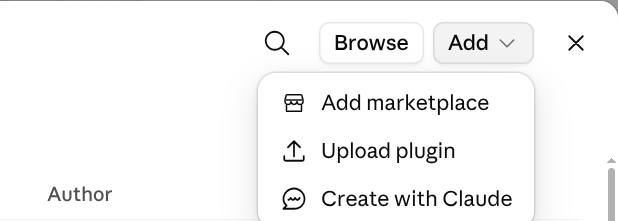
Open Settings → Plugins, then click Add ▾ in the top-right and choose Add marketplace.
Enter the marketplace repo fractal-manifold/mcp-marketplace and confirm.
Back in the plugin list, find Tokenmonitor by fractal-manifold and click Install.
Codex CLI reads the same marketplace Claude Code does. Two shell commands — add the marketplace, then install the plugin from it. Nothing else to install first: the plugin bundles its own server.
Skills and MCP servers are read when a thread starts, so open a new Codex thread afterwards. Confirm with codex plugin list — tokenmonitor@fractalmanifold-mcp-marketplace should read installed, enabled.
What it adds
# Skills (you invoke these) — the CLI gets all four
/tokenmonitor:configure
/tokenmonitor:theme <day|night|auto>
/tokenmonitor:settings <change>…
/tokenmonitor:firmware
# Tools Codex calls as needed — the diagnostic four,# plus control-plane tools the skills drive for you
tokenmonitor_status
tokenmonitor_health
tokenmonitor_recent_logs
tokenmonitor_provision_hint
Where it lives
The plugin is cached per-user under ~/.codex/plugins/cache/fractalmanifold-mcp-marketplace/tokenmonitor/<version>/. Installing writes the marketplace source and an enabled flag to ~/.codex/config.toml — you never hand-author an [mcp_servers] block.
Update & remove
# updating takes both steps — refreshing the marketplace# snapshot alone leaves the cached plugin where it was$ codex plugin marketplace upgrade fractalmanifold-mcp-marketplace
$ codex plugin add tokenmonitor@fractalmanifold-mcp-marketplace
# uninstall$ codex plugin remove tokenmonitor@fractalmanifold-mcp-marketplace
Either way, start a fresh thread — a running one keeps whatever it loaded at start.
Don't register it by hand. A codex mcp add entry pointed at a tokenmonitor-mcp binary gets you neither the four skills nor the plugin manifest's 60-second first-start allowance — which the server needs the one time it resolves its runtime. Go through the marketplace.
The Codex desktop app browses the same marketplace. Same plugin, same skills and tools — clicked instead of typed.
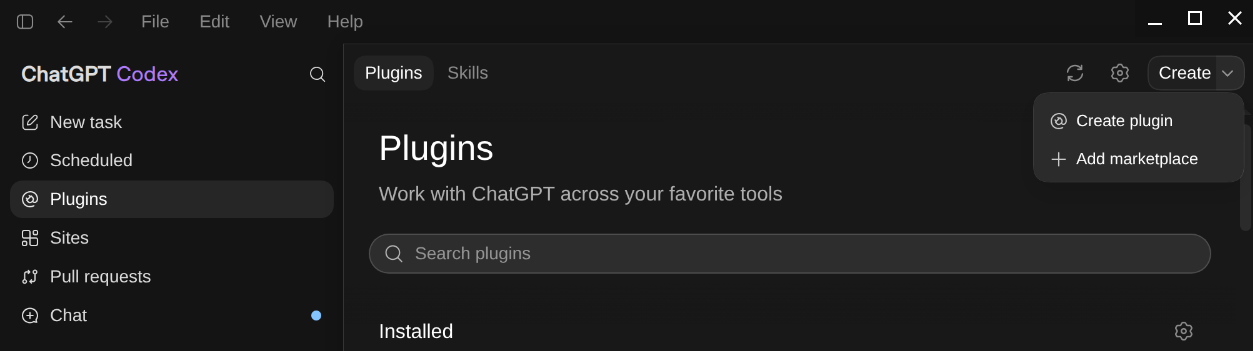
Open Plugins, click Create ▾ in the top-right and choose Add marketplace.
Point it at the marketplace repo fractal-manifold/mcp-marketplace.
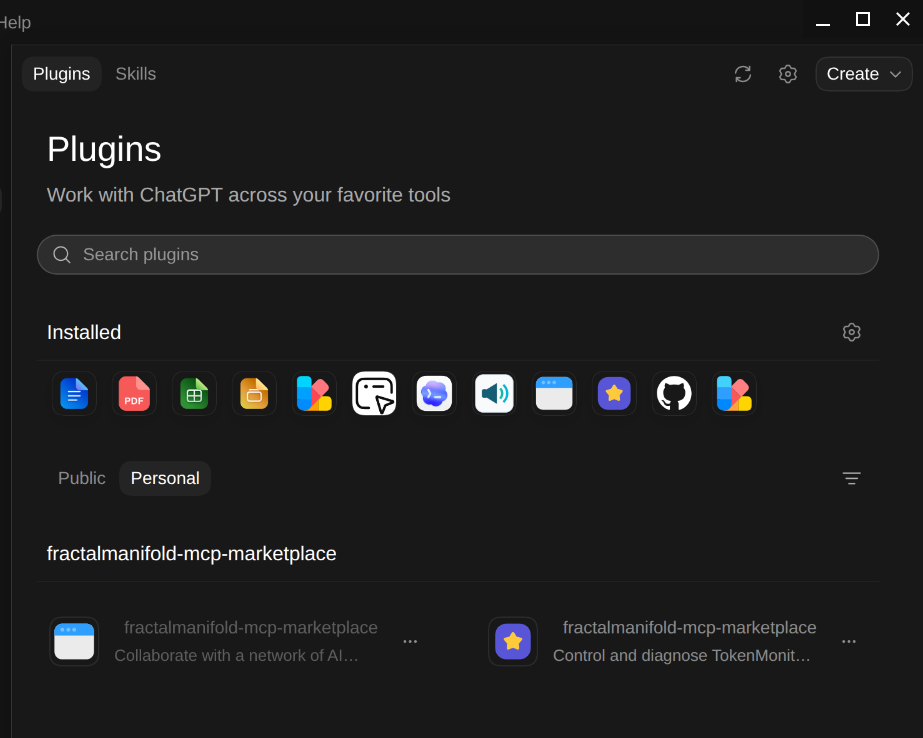
The fractalmanifold-mcp-marketplace section appears — install the TokenMonitor plugin (“Control and diagnose TokenMonitor…”).
Codex desktop → Plugins → Create ▾ → Add marketplace.The fractalmanifold-mcp-marketplace section, with the TokenMonitor plugin ready to install.
Antigravity — the agy CLI, Google's successor to the Gemini CLI — installs plugins straight from a GitHub subpath. One command; the plugin is self-contained (it bundles its own MCP server), so there's no separate broker install to wire up. (It still runs the Gemini-family models, e.g. gemini-3.5-flash and gemini-3.1-pro.)
The install copies the whole plugin — skills, hooks and the bundled server/ launcher. Start a fresh agy session to load it; remove it any time with agy plugin uninstall tokenmonitor.
Verify the plugin is loaded
Same prompt works in any of the three apps. It hits tokenmonitor_status under the hood.
What's the status of my TokenMonitor broker?
The broker is running with role leader on localhost:8765. It last served tmon-3c7c9a02 a few seconds ago and has handled 2,847 requests since it started 4 hours ago. Health: PASS.
If the answer comes back with a different broker role, an empty request count, or the app says it can't find the tool — head to the troubleshooting page.
Skills & MCP tools
Four skills. Four core tools.
Skills are explicit commands you invoke; tools are functions the model can call on your behalf. Both are loaded the moment the tokenmonitor plugin is installed — nothing else to wire up.
/tokenmonitor:configure
Pair or reconfigure a device
Provision a new device, or reconfigure an existing one, from the LAN. Discovers via mDNS, prompts for the 6-digit pairing code, pushes broker URL + auto-generated PSK, registers the device locally.
When to use
New device showing "Waiting for setup" / pairing code on screen
Moving the broker to a different machine
Rotating the passphrase / PSK
Re-establishing trust after a device factory reset
Syntax
/tokenmonitor:configure
What it does, step by step
Scans _tmon._tcp.local for advertised devices
Prompts you to confirm the pairing code on the device
Generates a random per-device key (or hashes a passphrase you set)
POSTs the broker URL + key to the device over the LAN
Writes the device entry under ~/.config/tokenmonitor/devices/
/tokenmonitor:theme
Switch themes remotely
Flip a device between Day, Night or Auto themes from the comfort of your CLI. Auto follows sunrise/sunset for the device's configured city with a ±90 s hysteresis.
When to use
Force Day mode for a screenshot
Force Night mode when you're working late and the sensor lags
Reset to Auto after manual overrides
Syntax
/tokenmonitor:theme<day | night | auto> [--device<device_id>]
Examples
/tokenmonitor:theme auto
/tokenmonitor:theme night --device tmon-3c7c9a02
/tokenmonitor:theme day --device kitchen
/tokenmonitor:settings
Reconfigure a provisioned device
Push runtime settings to an already-paired device via the control plane: city, day / night brightness, alert volume, which providers are enabled, auto-rotation, broker URL, passphrase rotation. The change applies on the device's next poll — about 10 seconds — with automatic rollback if it can't be promoted.
This skill will not change WiFi blind. Ask it to and it hands you to /tokenmonitor:configure, which does it properly: over a USB cable (no factory reset, and it keeps the broker URL and key), or over the LAN when the device already remembers the network you are naming. Note the cable is only listening while the device is in pairing mode — on a device that is already online, hold BOOT for 3–10 seconds and let go first; it reboots into pairing mode and then the USB route works. A device only ever auto-joins networks it has a password for, so an open network has to be chosen over the cable or on the device's own screen. Display and provider tweaks are also available in the on-device Settings panel (tap the gear on the dashboard).
/tokenmonitor:firmware
Stage a signed firmware update
Stage an over-the-air firmware update to the device across your LAN, through the broker. Each image is an Ed25519-signed manifest the device verifies before the boot slot switches — with automatic rollback if the new build doesn't check in healthy, and an anti-rollback floor against downgrades.
When to use
A new firmware release is available for your device
You want to move a device onto the dev / canary channel
Re-applying after an automatic rollback
Syntax
/tokenmonitor:firmware [--device<device_id>]
Safe by design
Updates only ever flow over your own LAN, and the device installs nothing it can't cryptographically verify. If a build won't boot cleanly, it reverts itself.
MCP tools
What the model can call directly.
These are the four you'll reach for directly — your AI agent calls them in response to natural-language questions, no slash-skill needed. The skills drive a larger set of control-plane tools (device registry, discovery, firmware publish / revert) behind the scenes.
tokenmonitor_status
Runtime, role + request count
Returns the broker's runtime, its role (leader or follower), when it last served the device, and the total requests handled since startup.
Runs a PASS/FAIL check across your provider credentials (present, parseable, not expired), a signed self-ping to the broker, and recently observed device traffic.
okcredentialsself_pingobserved_traffic
tokenmonitor_recent_logs
Tail the broker log
Returns the last N lines (default 50) of the broker's structured log. Useful when a device shows stale data and you want to see whether the broker even received the poll.
limit: string
tokenmonitor_provision_hint
Suggests laptop LAN URLs
Lists candidate broker URLs (your laptop's LAN interfaces) ranked by reachability. The captive portal uses this to populate the broker-URL field when you'd rather not run the configure skill.
urls[]preferred: string
Example
A new device, end to end.
Powered on, pairing code visible, plugin installed. From here:
I just powered on a new TokenMonitor. It's showing pairing code 428 715.
I'll configure it. Running /tokenmonitor:configure… Found tmon-3c7c9a02 at 192.168.1.42 via mDNS. Generated a device key and pushed it over the LAN. It's rebooting now — give it ~10 s.
Is my broker actually serving it?
Called tokenmonitor_status. Broker is running with role leader; it last served tmon-3c7c9a02 seconds ago, 12 requests so far. Health PASS.
Switch to night mode.
Ran /tokenmonitor:theme night. Device acknowledged in 110 ms.
Next step
Configure your device.
With the plugin loaded, /tokenmonitor:configure takes over from here. It discovers the device on your LAN, prompts for the pairing code, pushes the PSK.